AI technology has transformed the way people edit and enhance digital photos. Tasks that once required professional editing skills and complicated software can now be completed with just a few clicks. From removing unwanted objects to improving image quality, modern AI tools make photo editing faster and more accessible.
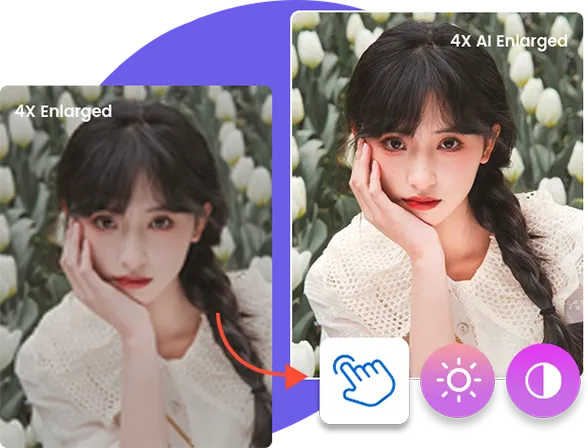
Whether you are a content creator, photographer, designer, or casual user, choosing the right AI image editor can save time and improve your results. In this guide, we compare six popular tools, explore their features, advantages, and limitations, and help you find the right solution for your editing needs.
What Makes an AI Image Editor Worth Using?
Before choosing an editing tool, consider several important factors:
- AI Editing Features: Look for useful functions such as background removal, object removal, image enhancement, and generative editing.
- Ease of Use: A simple interface helps beginners edit photos without spending hours learning complicated software.
- Output Quality: Good software should preserve image details, natural colors, and sharpness.
- Export Options: Multiple formats and resolution settings provide greater flexibility.
- Platform Compatibility: Check whether the tool supports Windows, macOS, browsers, or mobile devices.
- Pricing: Compare free features, subscription plans, and one-time payment options before making a decision.
Quick Comparison: 6 AI Image Editors at a Glance
| Tool | Platform | Pricing Model | Key AI Features | Best For |
| Leawo Photo Enhancer | Windows | Free/trial and paid options | AI enhancement, image restoration | Photo improvement |
| Adobe Photoshop | Windows, macOS, Web | Subscription | Generative Fill, object removal | Professional editing |
| Fotor | Web, Desktop, Mobile | Free and paid | Background removal, enhancement | Quick online editing |
| Pixlr | Web, Mobile | Free and paid | AI image generation, editing | Browser-based editing |
| Luminar Neo | Windows, macOS | Paid plans | AI lighting, sky replacement | Photography |
| Picsart | Web, Desktop, Mobile | Free and paid | Background editing, AI effects | Creative designs |
Pricing and feature availability may change depending on the platform, region, and subscription.
6 Best AI Image Editors Worth Using in 2026
1. Leawo Photo Enhancer
Overview
Leawo Photo Enhancer is an AI-powered photo editing solution designed to improve image quality and simplify common enhancement tasks. It is particularly useful for users who want to improve their pictures without manually adjusting every editing parameter.
The software focuses on AI-assisted photo enhancement, helping users work with image details, clarity, and overall appearance. Instead of spending significant time experimenting with complicated editing settings, users can explore automated enhancement features to achieve better-looking results.
Another related product is Leawo Photo Enlarger, which focuses on enlarging images while maintaining visual quality.
Key Features:
- AI-powered photo enhancement.
- Automated image improvement.
- Tools designed to improve image appearance.
- A straightforward desktop editing workflow.
Pros:
- Beginner-friendly approach.
- AI-assisted editing saves time.
- Useful for improving everyday photos.
- Dedicated desktop software.
Cons:
- Desktop-focused workflow.
- Some advanced capabilities may require payment.
- Results depend on the original image quality.
Best For: Users who want a straightforward AI image editor for improving everyday photos without complicated manual adjustments.
2. Adobe Photoshop
Overview
Adobe Photoshop remains one of the most recognized photo editing applications. Its AI-powered features make traditional editing workflows more efficient while providing creative flexibility for experienced users.
Generative Fill allows users to add, replace, or modify image elements using text prompts. Other tools help remove unwanted objects, select subjects, and modify backgrounds.
Key Features:
- Generative Fill and Generative Expand.
- AI-assisted object removal.
- Background selection and replacement.
- Advanced layers and masking.
- Professional color and image adjustments.
Pros:
- Extensive editing capabilities.
- Powerful generative AI features.
- Suitable for professional projects.
- Large collection of tutorials and learning resources.
Cons:
- Subscription-based pricing.
- Can be complicated for beginners.
- Requires a capable computer for demanding projects.
Best For: Professional photographers, graphic designers, and creators who need advanced editing and creative control.
3. Fotor
Overview
Fotor is an online photo editing platform that combines traditional editing tools with AI-powered features. Its browser-based interface makes it accessible to users who do not want to install complicated desktop applications.
Users can explore automatic image enhancement, background removal, object editing, and creative image effects. It also offers design templates that can help with social media graphics and promotional content.
Key Features:
- AI photo enhancement.
- Background removal.
- AI object removal.
- Image generation and creative effects.
- Templates and design tools.
Pros:
- Easy-to-understand interface.
- Accessible through a web browser.
- Useful for quick edits.
- Combines editing and design features.
Cons:
- Some features require a paid subscription.
- Free usage may have limitations.
- Advanced editing control is more limited than Photoshop.
Best For: Beginners and social media users who need quick online photo editing and design features.
4. Pixlr
Overview
Pixlr provides an online editing environment with tools for both basic image adjustments and more creative editing tasks. It is a convenient choice for people who prefer browser-based applications.
The platform offers AI-assisted features alongside traditional editing options. Users can work with layers, filters, image effects, and background editing without necessarily installing professional desktop software.
Key Features:
- AI-powered image editing tools.
- Background removal.
- AI image generation.
- Layers and filters.
- Browser-based editing.
Pros:
- Accessible through a browser.
- Suitable for quick projects.
- Offers both basic and advanced editing options.
- Useful for casual designers.
Cons:
- Advertisements may appear in free versions.
- Some features require a subscription.
- Performance can depend on browser and internet connection.
Best For: Users who want flexible browser-based editing without installing large desktop applications.
5. Luminar Neo
Overview
Luminar Neo is a photo editing application designed particularly for photography enthusiasts and professionals. It uses AI-assisted tools to simplify adjustments that traditionally require multiple editing steps.
Its features focus on improving photographs through intelligent lighting adjustments, portrait enhancements, sky replacement, and other creative effects.
Key Features:
- AI-powered sky replacement.
- Portrait enhancement.
- Lighting and color adjustments.
- Background and object editing.
- Creative photo effects.
Pros:
- Photography-focused features.
- AI tools simplify complex adjustments.
- Useful creative editing options.
- Supports detailed image enhancement.
Cons:
- Paid software.
- Some advanced features require learning.
- Processing requirements depend on the project and computer.
Best For: Photographers who want AI-assisted tools for improving portraits, landscapes, and creative photography.
6. Picsart
Overview
Picsart is a creative editing platform that combines photo editing, graphic design, and AI-powered tools. It is especially popular among users who create content for social media and digital marketing.
Its editing environment includes background removal, creative filters, AI effects, and other features that help transform ordinary images into visually interesting content.
Key Features:
- AI photo editing.
- Background removal.
- AI image generation.
- Creative filters and effects.
- Templates for social media content.
Pros:
- Beginner-friendly interface.
- Available across multiple platforms.
- Large selection of creative tools.
- Useful for social media designs.
Cons:
- Some premium features require payment.
- The interface can feel crowded.
- Results may require additional manual adjustments.
Best For: Social media creators and casual designers who want creative photo editing tools in one platform.
Tips for Quick and Easy Photo Editing
Choosing a good editor is only part of the process. A few practical techniques can help improve your results.
1. Start with a High-Quality Source Image
Always begin with the best available original image. AI tools can improve certain visual details, but starting with a sharp, well-lit photograph generally produces better results.
2. Remove or Replace Distracting Backgrounds
A busy background can draw attention away from the main subject. Use AI background removal to isolate the subject or replace the background with something more suitable.
3. Improve Lighting, Colors, and Details
Adjust brightness, contrast, saturation, and sharpness carefully. AI enhancement tools can speed up these adjustments, but avoid excessive editing that makes photos look unnatural.
4. Use Generative AI to Expand or Modify Images
Generative AI can help extend image backgrounds, replace unwanted objects, and create alternative visual elements. Always review the final result for unnatural edges, incorrect details, or inconsistencies.
FAQs
Can I use an AI image editor for free?
Yes. Several platforms, including Fotor, Pixlr, and Picsart, offer free versions or limited free features. However, advanced tools, higher-resolution exports, and additional credits may require payment.
Can AI image editors improve low-quality photos?
Yes. AI enhancement tools can improve sharpness, reduce noise, and upscale images. However, results depend on the original photograph, and extremely poor-quality images may not be fully recoverable.
Are AI-edited images suitable for commercial use?
They can be, but commercial usage depends on the software’s licensing terms, the original image’s copyright, and any applicable AI-generated content restrictions. Always review the relevant terms before using images commercially.
Can AI image editors remove backgrounds automatically?
Yes. Many modern editors offer automatic background removal. These tools identify the main subject and separate it from the background, allowing users to replace or remove unwanted surroundings.
Are AI image editors safe to use with personal photos?
Generally, reputable applications can be used safely, but privacy practices differ. Review the provider’s privacy policy, understand how uploaded images are processed, and avoid submitting sensitive photographs to unfamiliar services.
Conclusion
AI image editing has made photo enhancement, background removal, object editing, and creative transformations more accessible than ever. Whether you need professional editing capabilities or simple improvements for everyday photographs, there are several useful tools available in 2026.
Adobe Photoshop is a strong choice for professionals, Fotor and Pixlr offer convenient online editing, Luminar Neo focuses on photography, and Picsart is useful for creative content. Meanwhile, Leawo Photo Enlarger is worth considering for users who want an AI-assisted desktop solution for improving photos.
Before purchasing a subscription, explore free versions or trial options to understand which features suit your workflow. Ultimately, AI tools work best when combined with human judgment and a final quality check.